Branch and franchise location map
The problem
Once a business runs classes in more than a handful of venues, "Is there a class near me?" becomes the most common question. Parents want to type a postcode, see the nearest venues, and go straight to a class that suits their child. Franchise networks need the same thing across many operators.
What you'd have to build yourself
- A venue database with addresses and coordinates, kept in sync with your timetable.
- Geocoding for postcodes and addresses, distance calculation and a radius filter.
- A map with pins, a venue detail panel, and the list of classes at each venue with live availability.
- Links from each class into booking, plus "navigate here" for the parent's maps app.
The Zooza map widget covers all of this from the venues and classes you already manage in Zooza.
How it looks
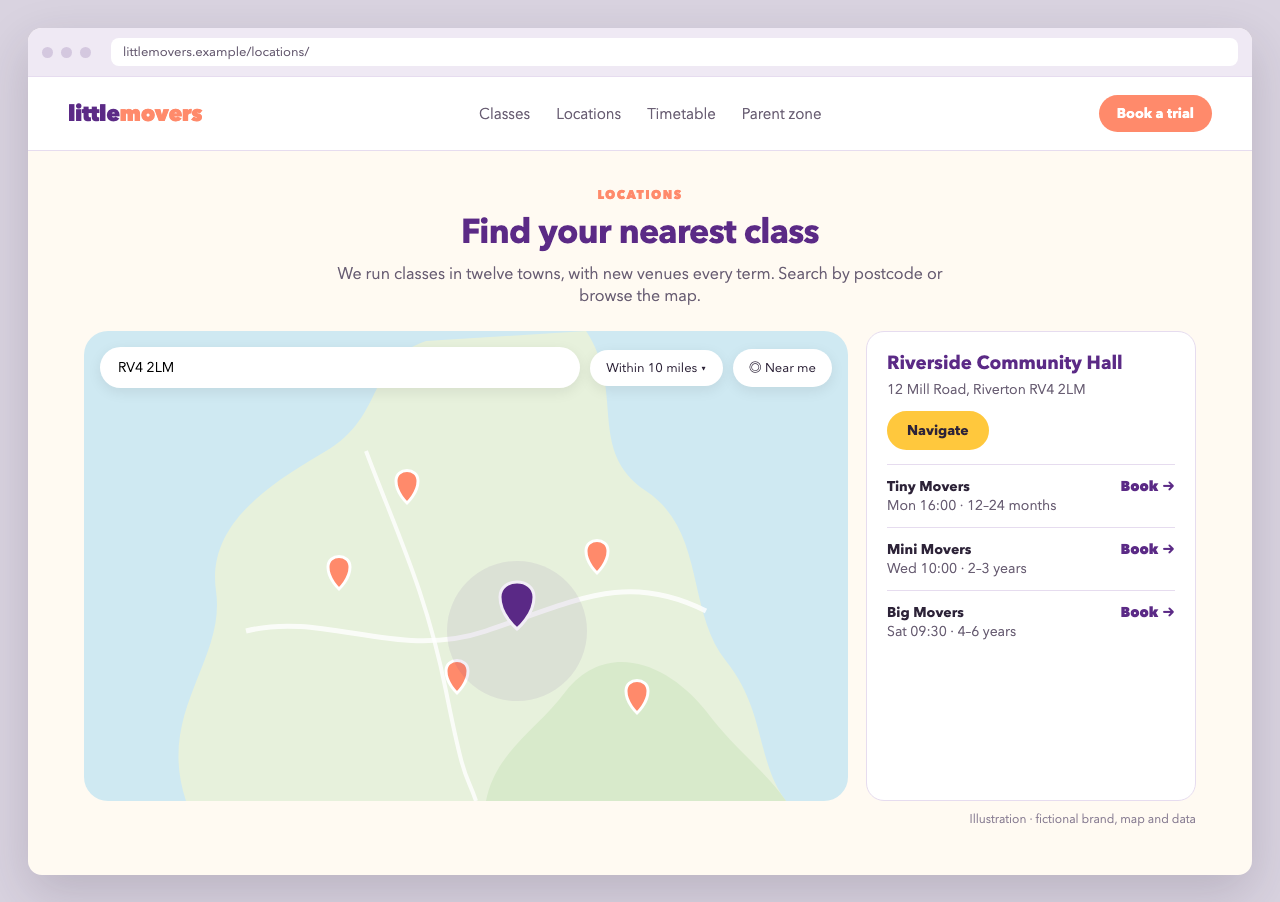
Little Movers' "Find a class" page has a short intro, then a full-width map with a pin for each venue. A search field accepts a postcode or address, and a slider narrows the radius. Below the map, the classes at the venues in view are listed by venue, nearest first. Selecting a pin highlights that venue and opens a bubble with its address, a booking link and a Get directions button. Each class links to the booking form.
The code
<section class="lm-locations">
  <p class="lm-eyebrow">Locations</p>
  <h1>Find your nearest class</h1>
  <p>We run classes in twelve towns, with new venues every term. Search by postcode or browse the map.</p>

  <div class="lm-map-host">
    <div class="lm-map-skeleton" aria-hidden="true">Loading map…</div>
    <div data-zooza-widget="map" data-zooza-id="YOUR_API_KEY"></div>
  </div>
</section>

<script async src="https://uk.api.zooza.app/widgets/v1/loader.js"></script>
.lm-map-host {
  position: relative;
  min-height: 560px;            /* reserve space: no layout shift while loading */
  border-radius: 24px;
  overflow: hidden;
  background: #f3eef8;
}
.lm-map-skeleton {
  position: absolute;
  inset: 0;
  display: grid;
  place-items: center;
  color: #5b2a86;
  font-weight: 700;
  background: repeating-linear-gradient( 135deg, #f3eef8 0 24px, #ece4f4 24px 48px );
}
/* Hide the skeleton once the map has finished loading (or failed) */
.lm-map-host:has( .zooza-map-widget:not( [data-status="loading"] ) ) .lm-map-skeleton {
  display: none;
}

/* Brand the map through its theme variables */
.lm-map-host .zooza-map-widget {
  --zooza-accent: #5b2a86;
  --zooza-pin-color: #ff7a59;
  --zooza-radius: 14px;
  --zooza-max-width: none;
}
The map widget uses the same v1 loader (/widgets/v1/loader.js) as the registration widget. Little Movers operates in the UK, so the loader comes from https://uk.api.zooza.app, and the map shows distances in miles automatically. Use your own region's URL.
Settings in the Zooza admin
The map's behaviour is configured in Publish > Widget > Map, not in code:
| Setting | Little Movers uses it for |
|---|---|
| Search by ZIP code | Postcode search alongside addresses |
| Show radius filter | "Within 10 miles" slider |
| Show use current location | One-tap "near me" on phones |
| Use age filter | Only classes for the child's age |
| Show navigate button | Opens the parent's maps app |
| URL | Where the map lives, so links come back to it |
Clicking a class takes the parent to the registration widget, so set its URL in the admin too.
Why it's built this way
- Reserved height and a skeleton keep the page from jumping when the map appears. That helps both parents and Core Web Vitals (CLS).
- The skeleton sits outside the placeholder, so the widget never has to deal with your markup. It is hidden by the widget's documented
data-statusattribute, with no script. - Branding goes through theme variables on
.zooza-map-widget, so it survives widget updates without overriding internal rules. - Venues come from Zooza, so opening a new venue or closing one updates the map without touching the website.
Variations
- Venue landing pages for SEO: create one page per town ("Kids' dance classes in Bristol") with local copy and a registration widget filtered by
place_ids. Link them from the map page. - Franchise networks: each franchisee keeps their own Zooza company, and the network site shows all venues together.
- Regional pages: open the map on one region instead of fitting every pin, with
map_view:<script>window.ZOOZA = window.ZOOZA || {};window.ZOOZA.widgets = window.ZOOZA.widgets || {};window.ZOOZA.widgets.map = { map_view: { center: { lat: 51.4545, lng: -2.5879 }, zoom: 11 } };</script> - Venue overview without the class list: add
data-zooza-show-schedules="false"to the placeholder (show_schedules) to show only the pins and their bubbles. - Deeper styling: when the variables are not enough, target the
zooza-map-*classes, scoped to.lm-map-host.